
Create meals and track Residents, Staff and Volunteers for and accurate count of meals in Empower Group Care. Creating and managing meals can’t be any simpler. Tracking meals can be accessed by staff who have permission set for Meals. Specific meals can also be assigned to staff members and/or groups.
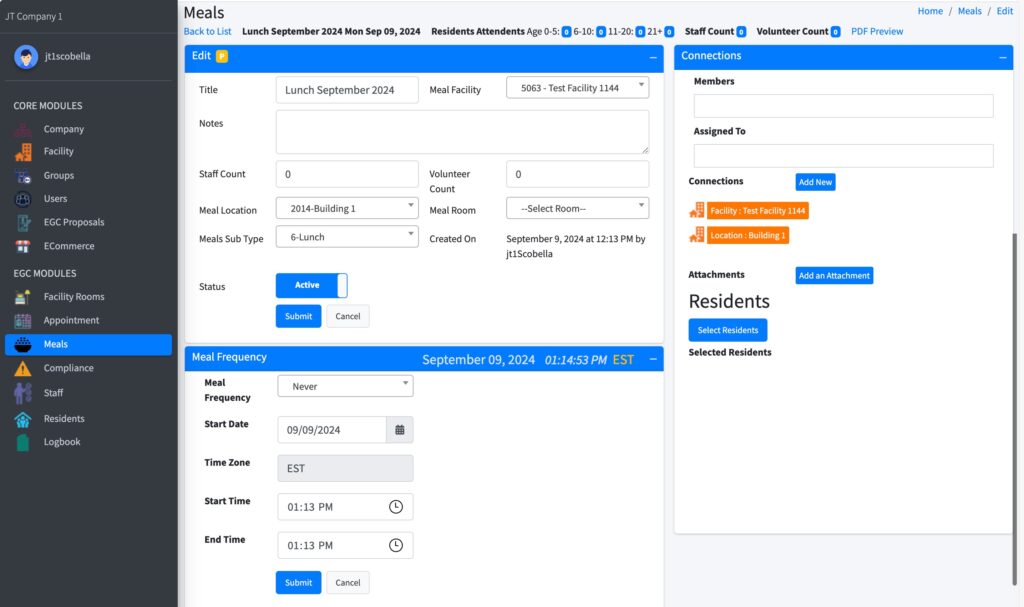
Create Meals #
- Select Meals from the sitemap.
- Select Create Meals
- Add Title (Example: Dinner)
- Select the Meal Facility.
- Select Meal Location (optional if meal facility is shared by locations)
- Select Meal Room (optional)
- Change Status to Active.
- Page reloads. Click Edit.
- Select Meal Frequency from the dropdown.
- Then choose OnGoing, Date, or Count
- Select Start Date and End Date (if applicable)
- Set Start Time and End Time for the meal.
- Select Submit to save.
See Also #
Set up meal types
Set up meal frequency – recurring meals
Assign residents to meals