
Manage the fields and tabs that display on the residents page in Empower Group Care, customized to your organization.
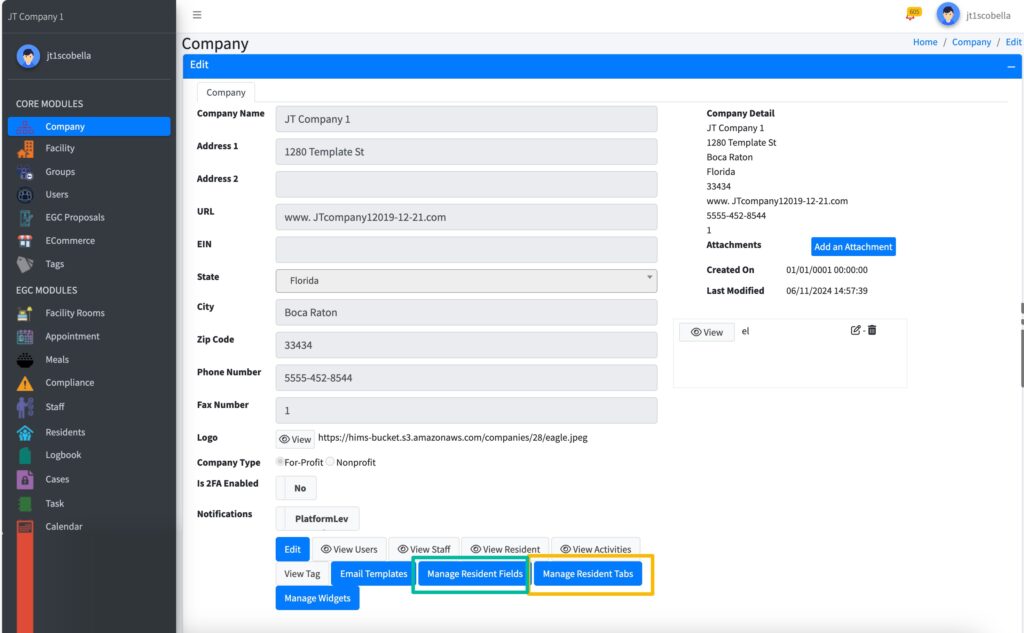
Manage Residents Fields #
- Sign in to Empower Group Care.
- In the sitemap, select Company.
- Select Manage Resident Fields.
- Choose from existing fields
- Toggle Active or Inactive for each field you wish to display on the Resident page.
- When selecting Create New, you have the option to create as text field or list.
- If you select list and do not find a list you wish to use, navigate to Lists in the side navigation to create your list.
- Toggle on Enabled, then Back to List
- Choose from existing fields
#
Manage Residents Tabs #
- Sign in to Empower Group Care.
- In the sitemap, select Company.
- Select Manage Resident Tabs.
- Choose from existing Tabs
- Toggle Active or Inactive for each field you wish to display on the Resident page.
- When selecting Create New, you have the option to create a list.
- If you do not find a list you wish to use, navigate to Lists in the side navigation to create your list.
- Toggle on Enabled, then Back to List.
- Choose from existing Tabs